A correction to your record goes in as a new entry, and the old one stays where it was.
That’s how the whole record works. Nobody, Kanonik included, can change an approved entry without the change showing.
Anyone you share the record with can check that themselves, which is the point of keeping it this way.
Here’s what the record does when Dana approves a draft.
- Kanonik
Her approval becomes a new entry.
At Harbor Ledger, our sample company, the entry keeps Dana’s name, the time, the words she ticked and the safety check’s result. A draft that was sent back stays in the log as well, with the reason and the name of whoever sent it back.
- Kanonik
The new entry is linked to the one before it.
Think of a ledger where each line also carries a fingerprint of the line above it. If someone alters line 40, lines 41 onward no longer agree with it, which is how a change gives itself away. The database refuses edits and deletes in the first place, and Kanonik signs the latest entry on a schedule, with a key that stays in its key vault.
- Kanonik
A correction never overwrites an entry.
If a vendor went on the record with the wrong owner, the fix is a new version that points back to the old one. We believe a correction belongs next to the mistake it fixes, where an auditor can read both.
- Kanonik
Two dates go on the entry.
One for when it took effect and one for when it was recorded. Those two dates are what let you read the record as it stood on any past day.
- The auditor
Your auditor’s reading goes on the chain too.
When someone with the auditor role opens a record, Kanonik notes who read it and when, on the same chain. The note holds nothing from the record itself, just the reader and the time.
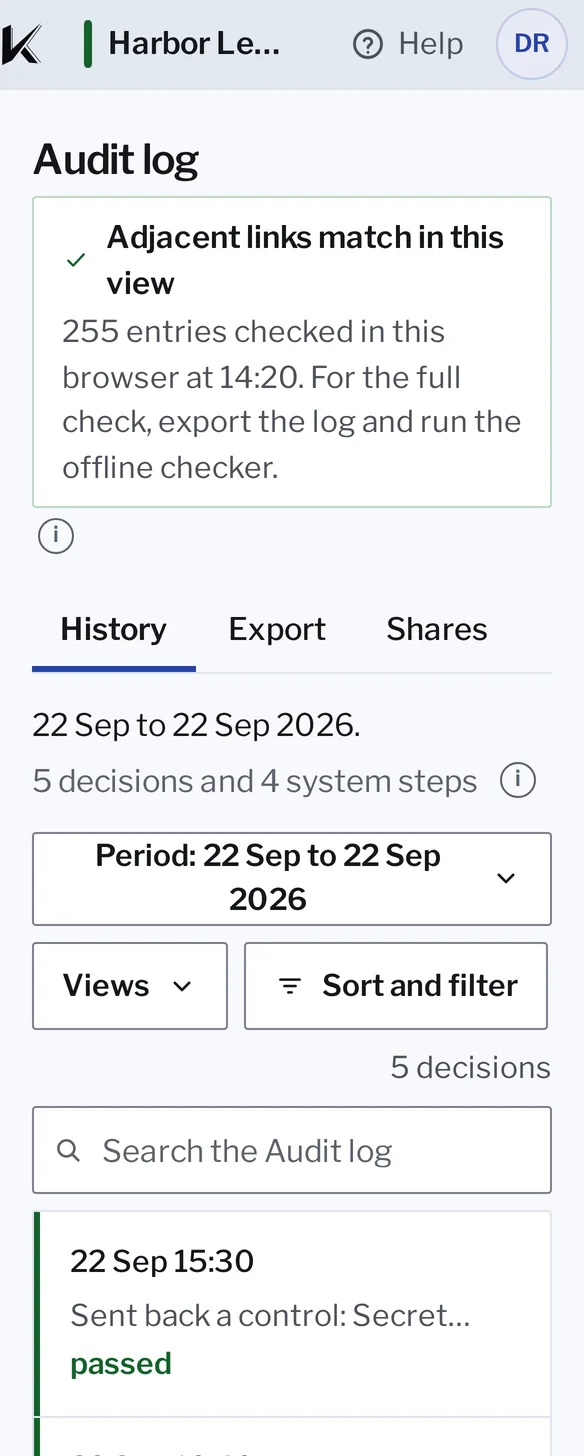
One press checks every link on the screen.
One press checks every link on the screen.
The Audit log in Kanonik, with sample data from Harbor Ledger. It plays once; then it’s yours to click through.
You can check the chain without asking us.
In the Audit log, Check the chain looks at the entries on your screen and tells you whether each one still links to the one before. That’s the quick look.
The full check, which your auditor runs with the checker in the Sealed Audit Package, works out every fingerprint again and tests Kanonik’s signature.