The next security questionnaire starts from answers your team already approved.
Paste the buyer’s file into your AI. It quotes your saved answers word for word, and it asks you only about what your record doesn’t hold.
You approve the whole set before anything goes back to the buyer.
Mei Lin answered Northshore Bank’s 64 questions for Harbor Ledger, our sample company.
Using Kanonik, answer the security questionnaire I paste next for Harbor Ledger. Answer from our record.
Northshore_TPRM_2026.xlsx4 sheets, 64 questions
kanonikpropose_questionnaire_responseWorkingProposed
Reading all four sheets against your record.64 answers are ready for you to read. 61 come from your record. 3 are stated by Harbor Ledger, with no record behind them. None are open.
| Row | Ref | Question | Answer | Source |
|---|---|---|---|---|
| 1.1 | Do you have an information security policy? | Yes, version 3.1 | PolicyInformation security policyChecked, approved 1 Mar. | |
| 1.2 | Do you have an acceptable use policy? | Yes | PolicyAcceptable use policyChecked, approved 10 Apr. | |
| 1.3 | Do you have a supplier security policy? | Yes | PolicySupplier security policyChecked, approved 20 Aug 2025. | |
| 1.4 | Do you run a risk assessment? | Yes | RiskPhishing leads to takeover of a finance mailboxChecked, approved 8 Sep. | |
| 1.5 | Do you hold cyber insurance? | Yes | StatedStated by the company, 25 Sep. No record behind it. | |
| Stated by Harbor Ledger. No record behind it. | ||||
| 1.6 | Have you assessed the risk of a regional cloud outage? | Yes | RiskRegional cloud outage stops payrollChecked, approved 22 Sep. | |
| 1.7 | Do you accept any residual risks? | Yes, one | Risk acceptanceAccept residual risk of contractor laptop lossChecked, approved 28 Aug. | |
| 1.8 | Do you control the use of AI tools? | Yes | RiskCustomer data pasted into an AI tool without a processing agreementChecked, approved 5 Sep. | |
| 1.9 | Are key policies reviewed every year? | Yes | PolicyInformation security policyChecked, approved 1 Mar. | |
| 1.10 | Do staff complete security awareness training? | Yes | EvidenceTraining completion, first half 2026Approved 30 Jun. | |
| 1.11 | Is training given at joining? | Yes, in the first week | ControlSecurity awareness training at joining and every yearChecked, approved 30 Jun. | |
| 1.12 | Is there an exception process? | Yes | ExceptionLegacy reconciliation server runs without endpoint protectionChecked, approved 4 Sep. | |
| 1.13 | Are audit findings tracked to closure? | Yes | Audit findingLeaver tickets closed without evidence of access removalChecked, approved 22 Sep. | |
| 1.14 | Have you had an external readiness review? | Yes, SOC 2 Type I | AuditSOC 2 Type I readiness review, Q4 2026Approved 15 Sep. | |
| 1.15 | Is physical security in scope? | No | Applicability decisionControl 7.4Checked, approved 10 Sep. | |
| 1.16 | Have you assessed the risk of an untested restore? | Yes | RiskUntested restores leave the ledger unrecoverable after corruptionChecked, approved 2 Sep. | |
| 1.17 | Have you assessed the risk of laptop loss? | Yes | RiskLost contractor laptop exposes customer statementsChecked, approved 28 Aug. | |
| 1.18 | Is phishing awareness trained? | Yes | ControlSecurity awareness training at joining and every yearChecked, approved 30 Jun. | |
| 1.19 | Is the acceptable use policy acknowledged by staff? | Yes | PolicyAcceptable use policyChecked, approved 10 Apr. | |
| 1.20 | Does the security policy name an owner? | Yes | PolicyInformation security policyChecked, approved 1 Mar. | |
| 15 more rows in this sheet | ||||
| Row | Ref | Question | Answer | Source |
|---|---|---|---|---|
| 2.1 | Is multi-factor authentication required for administrator access? | Yes | ControlSecurity keys required for every admin sign-inChecked, approved 1 Sep. | |
| 2.2 | Do you use single sign-on for staff? | Yes | AssetOkta tenantApproved 20 Jan. | |
| 2.3 | Is the admin sign-on policy documented? | Yes | EvidenceOkta sign-on policy for admin groupsApproved 1 Sep. | |
| 2.4 | Are admin group members exported for review? | Yes | EvidenceOkta admin group members, September exportApproved 18 Sep. | |
| 2.5 | Is privileged access reviewed? | Every quarter | Control testControl test: partial (operating effectiveness)Checked, approved 18 Sep. | |
| 2.6 | How quickly is access removed when someone leaves? | One working day | ControlAccess removed within one working day of leavingChecked, approved 20 Sep. | |
| 2.7 | Is access removal recorded? | Yes | ControlAccess removed within one working day of leavingChecked, approved 20 Sep. | |
| 2.8 | Do you have a joiner, mover and leaver procedure? | Yes | ProcedureJoiner, mover and leaver procedureChecked, approved 2 May. | |
| 2.9 | Is the leaver procedure shared between People Operations and IT? | Yes | ProcedureJoiner, mover and leaver procedureChecked, approved 2 May. | |
| 2.10 | Do you alert on unusual administrator sign-ins? | Yes | EvidenceLog store sources and retention settingsApproved 11 Aug. | |
| 2.11 | Is source code access controlled? | Yes | AssetGitHub organizationApproved 20 Jan. | |
| 2.12 | Are finance mailboxes protected against phishing? | Yes | AssetFinance team mailboxesApproved 20 Jan. | |
| 2.13 | Are partner API keys protected? | Yes | RiskPartner API keys committed to source controlChecked, approved 10 Sep. | |
| 2.14 | Is the customer portal behind single sign-on for staff? | Yes | AssetCustomer portalApproved 20 Jan. | |
| 12 more rows in this sheet | ||||
| Row | Ref | Question | Answer | Source |
|---|---|---|---|---|
| 3.1 | Is customer data encrypted at rest? | Yes | ControlCustomer data encrypted at rest with managed keysChecked, approved 11 Aug. | |
| 3.2 | Are company laptops encrypted? | Yes | ControlDisk encryption on company laptopsChecked, approved 2 Aug. | |
| 3.3 | Is the device encryption status reported? | Yes | EvidenceDevice management encryption reportApproved 2 Aug. | |
| 3.4 | Are encryption keys managed centrally? | Yes | EvidenceKMS key policies for customer data storesApproved 11 Aug. | |
| 3.5 | Is endpoint encryption enforced, not optional? | Yes | ControlDisk encryption on company laptopsChecked, approved 2 Aug. | |
| 3.6 | Where is customer data stored? | United States | AssetProduction AWS organizationApproved 20 Jan. | |
| 3.7 | Which system holds balances and transaction history? | The ledger database | AssetLedger databaseApproved 20 Jan. | |
| 3.8 | Where are customer identity documents kept? | The KYC document store | AssetKYC document storeApproved 11 Feb. | |
| 3.9 | Is the data warehouse encrypted? | Yes | AssetData warehouseApproved 20 Jan. | |
| 3.10 | Are staff and contractor laptops managed centrally? | Yes | AssetStaff and contractor laptopsApproved 20 Jan. | |
| 3.11 | Is the payments API on your asset inventory? | Yes | AssetPayments APIApproved 20 Jan. | |
| 9 more rows in this sheet | ||||
| Row | Ref | Question | Answer | Source |
|---|---|---|---|---|
| 4.1 | Do you have an incident response plan? | Yes | ProcedureIncident response procedureChecked, approved 12 Jun. | |
| 4.2 | Is the incident response plan tested? | Yes, April 2026 | EvidenceTabletop exercise notes, payments outageApproved 22 Apr. | |
| 4.3 | Do you back up production data? | Yes, nightly | ControlTwice-yearly restore test of the ledger databaseChecked, approved 14 Jul. | |
| 4.4 | When was a restore last tested? | July 2025 | EvidenceLedger restore test report, July 2025Approved 14 Jul 2025. | |
| 4.5 | Do you log administrator activity centrally? | Yes | ControlCentral logging of production access and changesChecked, approved 11 Aug. | |
| 4.6 | Have you had a reportable security incident in the last 24 months? | No | StatedStated by the company, 25 Sep. No record behind it. | |
| Stated by Harbor Ledger. No record behind it. | ||||
| 4.7 | Do you assess critical vendors before contract? | Yes | ControlSecurity review before onboarding a critical vendorChecked, approved 20 Sep. | |
| 4.8 | Does your card processor hold a SOC 2 report? | Yes, Type II, 2025 | EvidenceFerrow Card Services SOC 2 Type II report, 2025Approved 15 May. | |
| 4.9 | Who hosts your production systems? | Amazon Web Services | VendorAmazon Web ServicesApproved 20 Jan. | |
| 4.10 | Who is your identity verification provider? | Keystone Identity | VendorKeystone IdentityApproved 11 Feb. | |
| 4.11 | Do you keep an asset inventory? | Yes | AssetPayments APIApproved 20 Jan. | |
| 4.12 | Can logging be turned off without an alert? | No | ControlCentral logging of production access and changesChecked, approved 11 Aug. | |
| 4.13 | Who is your card processor? | Ferrow Card Services | VendorFerrow Card ServicesApproved 15 May. | |
| 4.14 | Are restores tested on a schedule? | Yes | ControlTwice-yearly restore test of the ledger databaseChecked, approved 14 Jul. | |
| 4.15 | Do you run penetration tests? | Yes, every year | StatedStated by the company, 25 Sep. No record behind it. | |
| Stated by Harbor Ledger. No record behind it. | ||||
| 4.16 | Are production logs retained for at least a year? | Yes, 13 months | ControlCentral logging of production access and changesChecked, approved 11 Aug. | |
| 4.17 | Does the incident plan say how customers are told? | Yes | ProcedureIncident response procedureChecked, approved 12 Jun. | |
| 4.18 | Do you use an identity verification vendor? | Yes, Keystone Identity | VendorKeystone IdentityApproved 11 Feb. | |
| 4.19 | Is cloud activity logged? | Yes | EvidenceLog store sources and retention settingsApproved 11 Aug. | |
| 16 more rows in this sheet | ||||
Mei reads the set and approves it once. Try it below.
- Mei
She pasted all four sheets into her AI.
They stayed in the bank’s own layout. She’d started the job Answer a security questionnaire in Kanonik, so her AI worked through the form with Kanonik’s questionnaire skill.
- Mei’s AI
The record answered most of it.
For 61 questions, the AI found an answer the team had already approved and quoted it exactly, with the source beside it. Kanonik marks those From your record.
- Mei
A few answers only the company can give.
Three questions, the cyber insurance limit among them, had nothing on the record behind them. Mei answered them, and Kanonik labeled them Stated. Where nobody has an answer yet, a question stays marked Open, and the buyer’s file gets no placeholder for it.
- Mei
She approved the set once.
One tick covers the whole set, with the counts in front of her as she ticks.
- Kanonik
The bank’s own file gets filled in.
Once she’d approved, Kanonik’s export put the answers into the bank’s own spreadsheet, and Mei downloaded it. Anything marked under NDA stayed out. Each answer comes with a proof file the bank can check for itself.
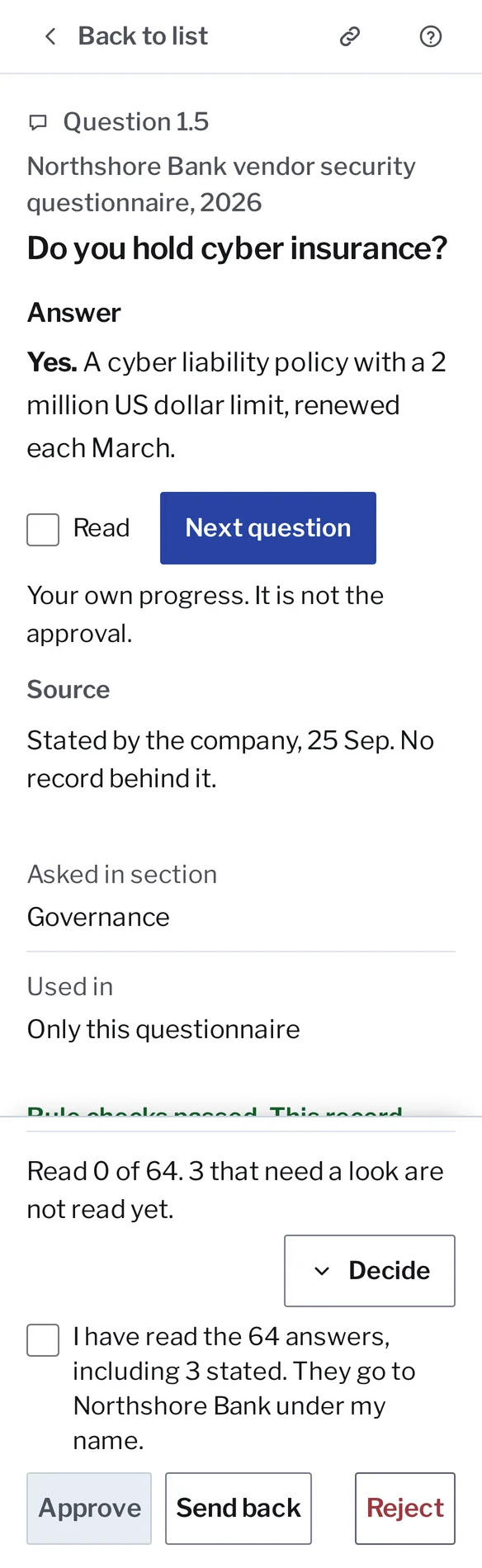
Three of the 64 answers are the company’s own word, marked Stated.
Sixty-one of the 64 answers carry their source.
A questionnaire answer set in Kanonik, with sample data from Harbor Ledger. It plays once; then it’s yours to click through.
An approved answer is saved, so you don’t write it twice.
Each approved answer becomes a saved answer, tied to the record it rests on. When the next buyer asks about encryption, your AI uses the same sentence, with the same proof behind it. Every buyer who asks should hear one answer from you. If it rewords an answer to fit a buyer’s form, Kanonik labels it as reworded by your AI and stops treating it as From your record.
When two answers in one set contradict each other, nobody can approve the set until one of them is fixed.